
When the original Tachiyomi project stopped, every fork had to decide whether to carry on. TachiyomiSY did, its developer said so in a release note, and the project has kept shipping updates built on top of Mihon.
This guide explains what TachiyomiSY (often shortened to SY) adds, whether it is still maintained, how to download it from the right place, how it differs from Mihon, and what happens to your backups if you move between the two.
A disclosure first. TachiyomiDownload.com is an independent information site. We are not affiliated with TachiyomiSY, Mihon or Tachiyomi. Details below come from the TachiyomiSY repositories and release notes on GitHub, and from Mihon’s documentation, last checked on October 14, 2026.
What is TachiyomiSY?
TachiyomiSY in one sentence: TachiyomiSY is a free, open-source Android manga reader maintained by jobobby04. It began as a fork of TachiyomiAZ, now takes its fixes and changes from Mihon, and adds extra features on top.
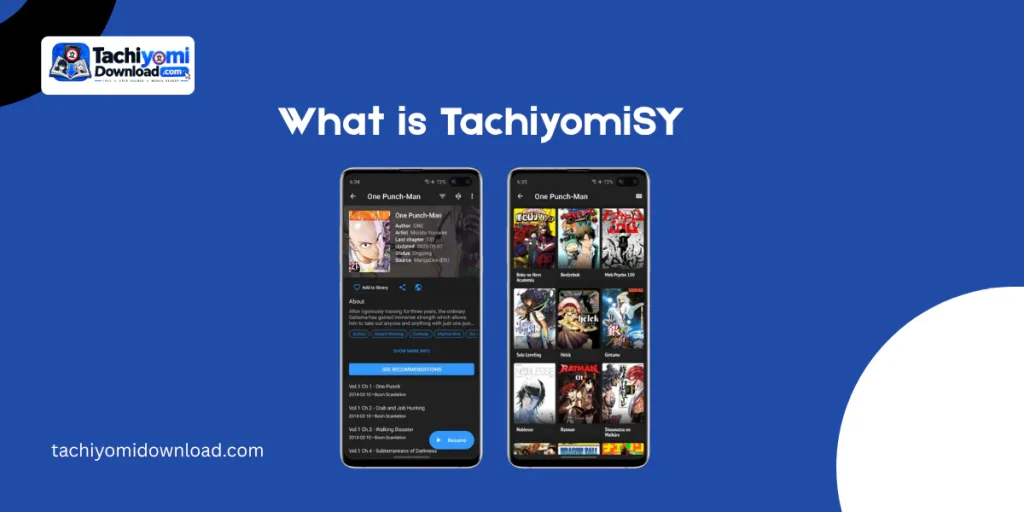
The README says SY aims to push forward on usability and features while staying close enough to the main app that it can keep pulling in updates. It also borrows ideas from other forks such as TachiyomiJ2K and Neko.
Think of it as Mihon plus extras. If you have read our Mihon guide, the basics (library, sources, extensions, backups) will feel familiar. The differences are in what SY layers on.
Is TachiyomiSY still maintained?
Yes. Three pieces of evidence from the official repository:
- A public commitment. The TachiyomiSY 1.10.1 release note says “TachiyomiSY will continue”, meaning the developer will take fixes and changes from Mihon while keeping the SY name.
- Mihon-based releases. Release notes record rebases on Mihon, such as v1.10.5 being based on Mihon stable 0.16.4. Later stable versions, including v1.12.0, appear in the issue tracker.
- Live issue tracker. New bug reports and feature requests were still being opened in August 2026.
That is a better position than the original Tachiyomi, which is not actively maintained. Our Tachiyomi discontinued page explains how that came about.
| Version box (update on publish day): Latest stable: [EDITOR: copy from github.com/jobobby04/TachiyomiSY/releases/latest]. Mihon base version: [EDITOR: copy from its release notes]. Minimum Android version: [EDITOR: confirm on the release page; the README text says Android 6.0, but it may be out of date]. Do not hard-code versions in body copy. |
What does TachiyomiSY add over Mihon?
The repository README lists the SY extras. In plain terms:
| Feature | What it does | Note |
|---|---|---|
| Feed tab | Shows the latest entries or saved searches from several sources in one place. | A hide-feed-tab option arrived in v1.10.4. |
| Saved searches | Stores a search so you can rerun it later. | Lost if you restore into Mihon. |
| Merged entries | Combines the same series from different sources into one entry. | Handy when a series moves. |
| Recommendations | Suggests related manga using MyAnimeList and AniList, plus Neko Similar Manga for MangaDex titles. | Per the README. |
| Tracking filter | Filters your library to tracked or untracked entries. | |
| Manga info edit and cover tools | Edit entry details, and view, share or save covers. | v1.10.4 added custom thumbnail URLs. |
| Source migration | Moves a library from one source to another. | Mihon also has a source migration tool. |
| Extra duplicate handling | A “mark dupes as read” option. | Added in v1.10.4. |
| MangaDex extras | Additional features when reading through MangaDex. | Listed in the README. |
A note on adult content. SY also includes integrations for E-Hentai and ExHentai, and a filter to hide adult-oriented entries from your library. The README lists a setting in Advanced to enable or disable “Hentai features”. If you share a device, or you are under 18, keep that setting off and read the Disclaimer on this site.
TachiyomiSY vs Mihon: which should you use?
Both are Android readers with the same core idea. The choice is about features versus simplicity.
| TachiyomiSY | Mihon | |
|---|---|---|
| Maintainer | jobobby04, with community contributions. | The Mihon team. |
| Origin | Fork of TachiyomiAZ, now following Mihon. | Fork of Tachiyomi, continuing its codebase. |
| Extras | Feed tab, saved searches, merged entries, recommendations, more. | The core feature set, with a focus on stability. |
| Release rhythm | Stable releases plus separate Dev Build previews. | Stable, FOSS and Nightly builds. |
| Backup format | .tachibk / .proto.gz, shared with Mihon. | Same format. |
| Support | GitHub issues; the README points to Mihon’s Discord. | Docs, Discord, GitHub and Reddit. |
The rule of thumb: pick Mihon if you want the standard, most documented experience. Pick SY if you will actually use the feed, saved searches or merging. Our Mihon vs Tachiyomi page covers the older comparison, and the Tachiyomi alternatives roundup puts SY next to the other forks.
One more cross-check: if you are on iOS or Windows, neither is an option. See Mangayomi instead.
How do I download TachiyomiSY?
Use the project’s GitHub repository and open its releases page: TachiyomiSY releases. The release notes say that if you are unsure which file to choose, you should take the main TachiyomiSY.apk.
- Stable. The normal release channel, listed on the main repository.
- Preview (“Dev Build”). Early builds from a separate repository, TachiyomiSYPreview. The README suggests them if you want new features before the stable release. They can be less stable.
- Per-device files. Release notes list universal, arm64-v8a, armeabi-v7a, x86 and x86_64 variants. The universal file works on any device and is larger.
- Checksums. Each release publishes SHA-256 values for its files, so you can confirm your download matches.
Fake sites are the main risk, as with Mihon. Make sure the repository owner is jobobby04. Skip any site that wants a survey or a “downloader”, and be wary of “TachiyomiSY mod” files, since a modified APK from an unknown uploader cannot be trusted. Our Tachiyomi extensions hub makes the same point about third-party code.
- Download the APK from the official releases page.
- Open it and allow installs from your browser or file manager if Android asks.
- Finish the install and open the app.
- Restore a backup, or start adding sources.
How do backups move between Tachiyomi, Mihon and SY?
Mihon’s docs say Mihon and Tachiyomi forks, including SY, share the .tachibk / .proto.gz backup format, so a backup can usually be restored across them. The catch is anything fork-specific.
| Move | What usually carries over | What may be lost |
|---|---|---|
| Tachiyomi to SY | Library, history, categories, tracking. | Extensions must be reinstalled. |
| Mihon to SY | Library, history, categories, tracking. | Extensions must be reinstalled. |
| SY to Mihon | The core library data. | SY-only settings such as saved searches. The docs say these are not restored in Mihon. |
Before any move, save a backup somewhere outside the app. Our Tachiyomi backup and restore and Tachiyomi migration pages cover the steps, and the habits are the same for SY.
Extensions and sources in TachiyomiSY
SY works like Mihon here: it ships without sources, and you add extensions yourself. Because SY follows Mihon, it tracks Mihon’s extension compatibility, and a preview build note mentions loading newer extension formats. TachiyomiDownload.com does not run or endorse any extension repository.
TachiyomiSY not working? Common problem areas
The issue tracker shows the kinds of problems users report. These are reports, not confirmed faults:
| Symptom | Where reports cluster | What to try |
|---|---|---|
| Library restore problems | Restoring backups, especially across forks. | Check the backup came from a compatible app, then retry. Keep the original file. |
| Extensions not installing or updating | Recent reports in the tracker. | Update the app, check install permissions, and see our Tachiyomi troubleshooting page. |
| Sync trouble | Reports mention Syncyomi. | Check the sync setup and the open issues before changing anything. |
| Cloudflare-protected sources | A March 2026 report found the bypass worked only after trying it in Mihon. | Update SY and try another network. That issue was closed as not planned. |
Search the issue tracker before filing a new report, and include your SY and Android versions.
Other forks built on SY
Komikku describes itself as based on TachiyomiSY and Mihon, taking updates from both. Mihon’s docs also name TachiyomiAZ, TachiyomiJ2K and Yōkai. We compare them on the alternatives page, including TachiyomiJ2K.
Is TachiyomiSY safe and legal?
The code is public on GitHub, so it can be inspected. Safety depends on where you download the APK and which extensions you install. Legality depends on what you read and where you live. The app is ordinary software; the content is governed by copyright law. This is not legal advice.
TachiyomiSY FAQ
What is TachiyomiSY?
A free, open-source Android manga reader maintained by jobobby04, built from TachiyomiAZ and now following Mihon, with extra features such as a feed tab and saved searches.
What does SY stand for?
The name is TachiyomiSY. The project documentation does not spell out the letters, so we do not guess.
Is TachiyomiSY still updated?
Yes. The developer committed to continuing in the 1.10.1 notes, releases follow Mihon, and the issue tracker was still active in August 2026.
Where do I download TachiyomiSY?
From the releases page of the jobobby04/TachiyomiSY repository. Preview builds are in jobobby04/TachiyomiSYPreview.
Is TachiyomiSY better than Mihon?
It has more features, while Mihon is simpler and better documented. Choose by whether you will use SY’s extras.
Can I restore a Tachiyomi or Mihon backup in SY?
Generally yes, because the forks share a backup format. Extensions must be reinstalled.
What do I lose moving from SY to Mihon?
SY-specific settings such as saved searches are not restored in Mihon.
Can I turn off the adult features?
Yes. The README says the Hentai features can be enabled or disabled in advanced settings.
Where to go next
If SY’s extras appeal, grab the official release and keep a backup handy. If you would rather stay simple, our Mihon guide is the better start, and the Tachiyomi alternatives roundup covers the rest.
Are you coming from Tachiyomi, Mihon or another fork? Use our Contact page and we will point you to the right guide.